
Lepakshi ECG Annotator — Label ECG Leads with Bounding Boxes

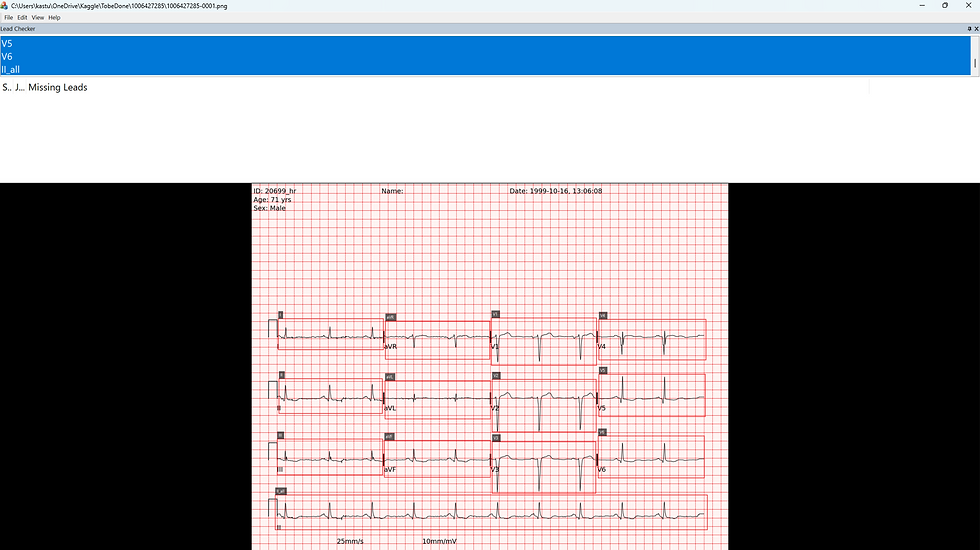
Intuitus has released Lepakshi-ECGAnnotator Beta version, a compact Windows application designed for fast, accurate annotation of 12‑lead ECG images. It supports interactive bounding‑box creation, keyboard‑driven adjustments, JSON export, and a clean, responsive UI — ideal for preparing datasets for YOLO (You Only Look Once) and other computer‑vision workflows. YOLO is a real‑time object detection method that identifies and localizes multiple objects in a single pass through a neural network.
Although built for ECG lead localization, the tool is fully generic and can be used for any bounding‑box annotation tasks for applications in medical diagnostic images (CT or MRI) or agriculture applications. A more generic version would be released a little later
For ECG annotation I have used dataset from Kaggle [1] competition. Download or explore the executable from here:
This folder has an example dataset from Kaggle competition [1].
Features
• Create bounding boxes using the rubber-band mouse technique by clicking and dragging with the left mouse button.
• A labeling dialog appears after creating a box to add or edit labels, which are saved with the boxes.
• Select, move, and resize boxes by clicking inside, dragging to move, or adjusting corner handles.
• Use keyboard controls: Arrow keys move boxes, Ctrl + Arrow resizes edges, Delete removes boxes, Ctrl+Z for undo, and Ctrl+Y for redo.
• Enforces minimum box size and boundary checks within the client area.
• Annotations are saved in a JSON file next to the image and automatically loaded when opening an image, supporting various formats.
• Uses filename heuristics for JSON files and maps annotations from image to client coordinates, handling duplicates with an IoU threshold.



Comments